
How the application works
Platform
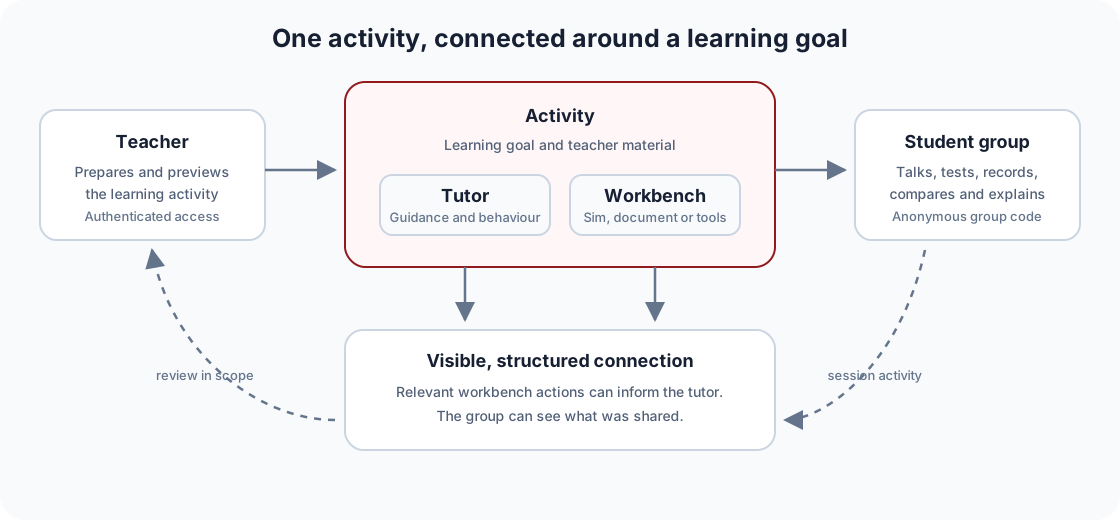
The AIPLA application supports teacher-prepared, group-based physics activities. It combines conversation with structured work surfaces while keeping the teacher, activity, and learning goal at the centre.
This page describes the public conceptual architecture. Detailed service configuration, operational runbooks, security incidents, and access-control implementation remain in the engineering repository.
The activity model
The main hierarchy is:
- Teacher: prepares activities and reviews use within their authorised scope.
- Class: groups activities and participating student groups in a teaching context.
- Group: the unit students use to join and work together.
- Activity: the configured learning experience, including tutor behaviour, material, and workbench elements.
Students use a short-lived group code supplied by a teacher. They are not asked to create personal AIPLA accounts for the group activity path.
One activity, several connected surfaces
AIPLA separates different kinds of interaction without separating them into unrelated applications.
Conversation
The chat surface holds the guided exchange between a student group and the tutor. It can render physics notation and refer to approved activity context.
Workbench
The workbench contains active material such as a simulation, document, checklist, table, chart, calculator, note, concept map, or submitted image. It gives students something concrete to inspect, manipulate, or construct.
Persistent context and focused actions
Additional surfaces can show relevant context or ask for explicit approval. Teacher-facing AI assistance follows a propose-and-apply pattern so changes are not made silently.
Structured sharing between workbench and tutor
An interactive artefact should not be a silent iframe beside a chatbot. When educationally relevant, the workbench can send structured state — for example, a selected parameter or completed step — to the host application and tutor.
Students are shown visible indications of what has been shared. The tutor should use only the information it has actually received.
The connection also works in the other direction: a tutor can ask the student to return to a particular representation, make a prediction, or test a change. The student remains the actor operating the workbench.
Reviewed interactive artefacts
Simulations and other interactive HTML artefacts run through a dedicated, isolated delivery path. Artefacts are versioned and reviewed before being made available as maintained activities.
The separation limits what an artefact can access and provides a common bridge for supported interaction with the AIPLA host. A generated or externally supplied artefact is not automatically trusted because it renders successfully.
Teacher control and authoring
Teachers can prepare activities from templates or their own material. Configurable parts can include:
- title and learning goal;
- tutor instructions or teaching approach;
- curriculum and uploaded source material;
- checklists, tables, calculators, notes, charts, or solution fields;
- an approved simulation or other workbench; and
- preview and sharing settings.
AI assistance may propose an activity or edit, but the teacher reviews and applies the change.
Roles and access
The platform distinguishes student group access, teacher access, approved research access, and a small amount of service administration.
- Student groups enter only the activity associated with their code.
- Teachers manage their classes, activities, materials, and relevant session views.
- Researchers use a separately authorised role for approved cross-class analysis.
- Administrators operate the service rather than teach with it: granting the roles above and setting programme-level usage limits. The role is held by named project staff.
The existence of a technical role does not itself authorise a research use. Study approval, participant information, and data-governance requirements still apply.
Model and provider independence
The activity layer is designed so that model choice can vary by environment and task. The application should not require teaching material or interfaces to be rebuilt whenever a provider or model changes.
Routing decisions can consider task capability, modality, operational constraints, data requirements, latency, and cost. The evaluation framework provides evidence for those decisions.
Observability and reproducibility
Operational logs and version identifiers help the team determine which application revision and configuration produced an interaction. Research records can also be associated with a build version where approved.
This matters because an AI-supported activity is not defined by the visible prompt alone. Application code, model configuration, source material, tutor instructions, and interactive artefact version can all affect the experience.
Open and replaceable components
The platform uses standard web application components and open interaction protocols where practical. Interactive artefacts and teaching configurations are versioned so that they can be inspected and moved.
Replaceability is a design goal, not a claim that migration is effortless. Identity, data storage, model hosting, research analytics, and institutional operations each require their own review and transition plan.
For the current public deployment and future hosting direction, see Data, privacy, and hosting.
The product choices behind this structure are recorded on Project decisions.
- Content status
- Current
- Maintained by
- AIPLA technical team
- Last reviewed